Redrawing the Saga pattern for Temporal
EOModeller blog · post 005
A business transaction that spans several services can't be rolled back like a database transaction. The usual answer is the Saga pattern: run the steps one after another, and give every step that changes something a compensation that undoes it. If a later step fails, run the compensations for the steps that already succeeded, newest first, and the system is back where it started.
Temporal makes sagas much easier to write, because a Temporal Workflow is durable: it remembers which steps have finished even if the process running it crashes. Temporal's technical guide The Saga Pattern Made Easy (January 2024) explains the pattern with one figure and then implements it in TypeScript, from the saga sample in Temporal's examples.
I rebuilt both, the figure and the code, as one model in EOModeller, using a new Temporal profile. The aim was to see what a model adds to a good explanation. Quite a lot, it turns out.
Figure 1, redrawn
The guide's figure (adapted from Baeldung's Saga Pattern in Microservices) shows an order going through four steps: receive the order, take payment, get the items from stock, deliver. Under each step is a box saying what to do if it fails, joined by a dashed "On Failure" line. Steps are green and compensations magenta.
Here it is as a model:
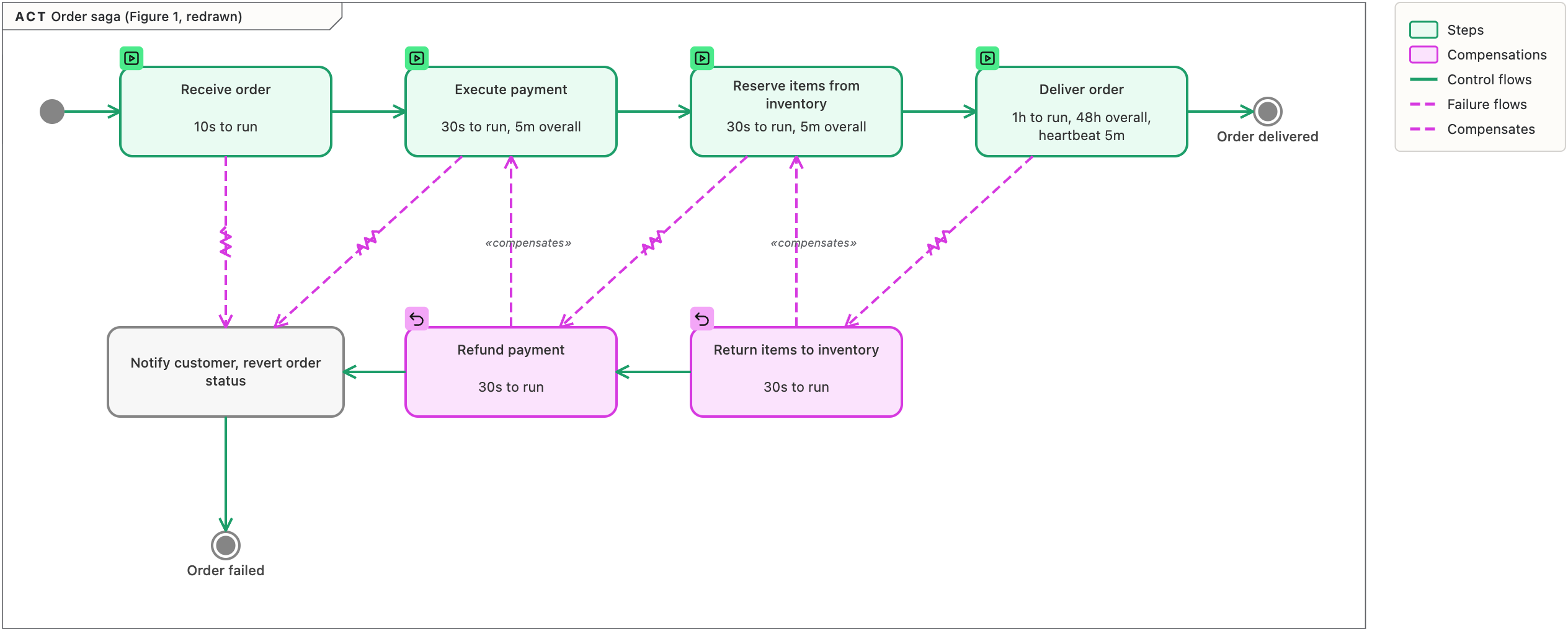
It keeps the paper's look: green steps, magenta compensations, dashed failure lines, an icon badge on each box. That look comes from a stylesheet applied to a UML activity diagram, not from drawing, and the legend says what the colours mean. Underneath, each box is a model element: the steps are «Activity» actions and the compensations are «Compensation» actions.
Modelling it changed three things:
- A failed step isn't undone; the steps before it are. If payment succeeds and getting the items fails, there's nothing to undo for the items, but the payment has to be refunded. So each dashed failure line starts the undo at the previous step's compensation. A separate «compensates» line shows which step each compensation undoes, and the compensations run right to left, newest first.
- Not everything in the bottom row is a compensation. The figure's first box, "tell the customer something went wrong", doesn't undo anything, because receiving an order changes nothing to roll back. In the model it's an ordinary action at the end of every failure path.
- Every step has a timeout. The figure doesn't say how long a step may take, and Temporal won't run an Activity without a timeout. EOModeller's validation flagged all six boxes until I added one. It's also why the Temporal retries are safe: Temporal retries a failed Activity on its own, within its timeouts, before the Workflow ever sees a failure.
The code's saga
The guide's code doesn't implement the order example. It opens a bank account instead: create the account, add an address, add a client, add a bank account. That makes the figure and the code hard to check against each other, so the code gets its own diagram:
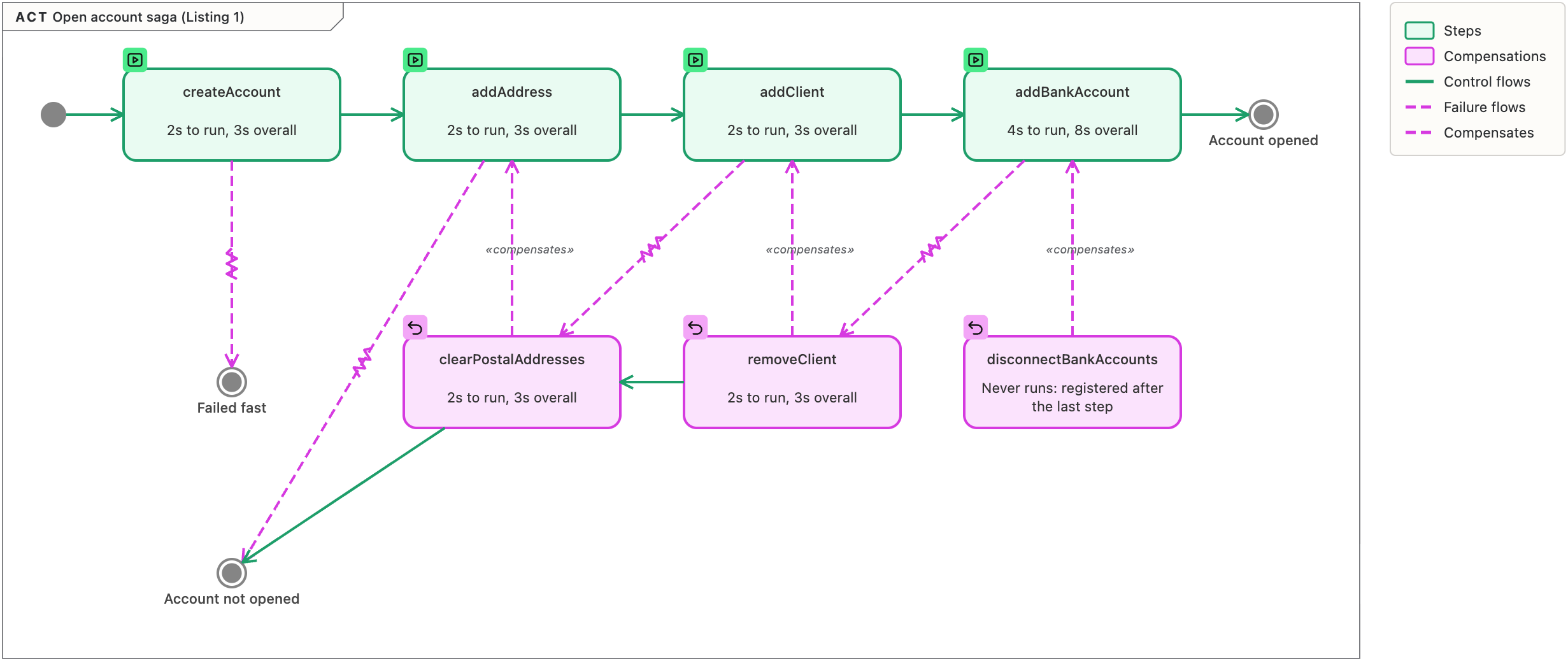
The timeouts are the sample's own: two seconds to run each step and three overall, and twice that for adding the bank account. Drawn out, two things stand out that are easy to miss in the listing:
- The first step fails fast. If creating the account fails, there's nothing to compensate, so the Workflow simply stops.
- One compensation never runs. The code registers
disconnectBankAccountsafter the last step succeeds, so there's no later step left to fail. On the diagram it's the box with no way in. It's harmless, but it's the sort of thing a model shows at a glance and a reviewer reading code can easily miss.
What the code is made of
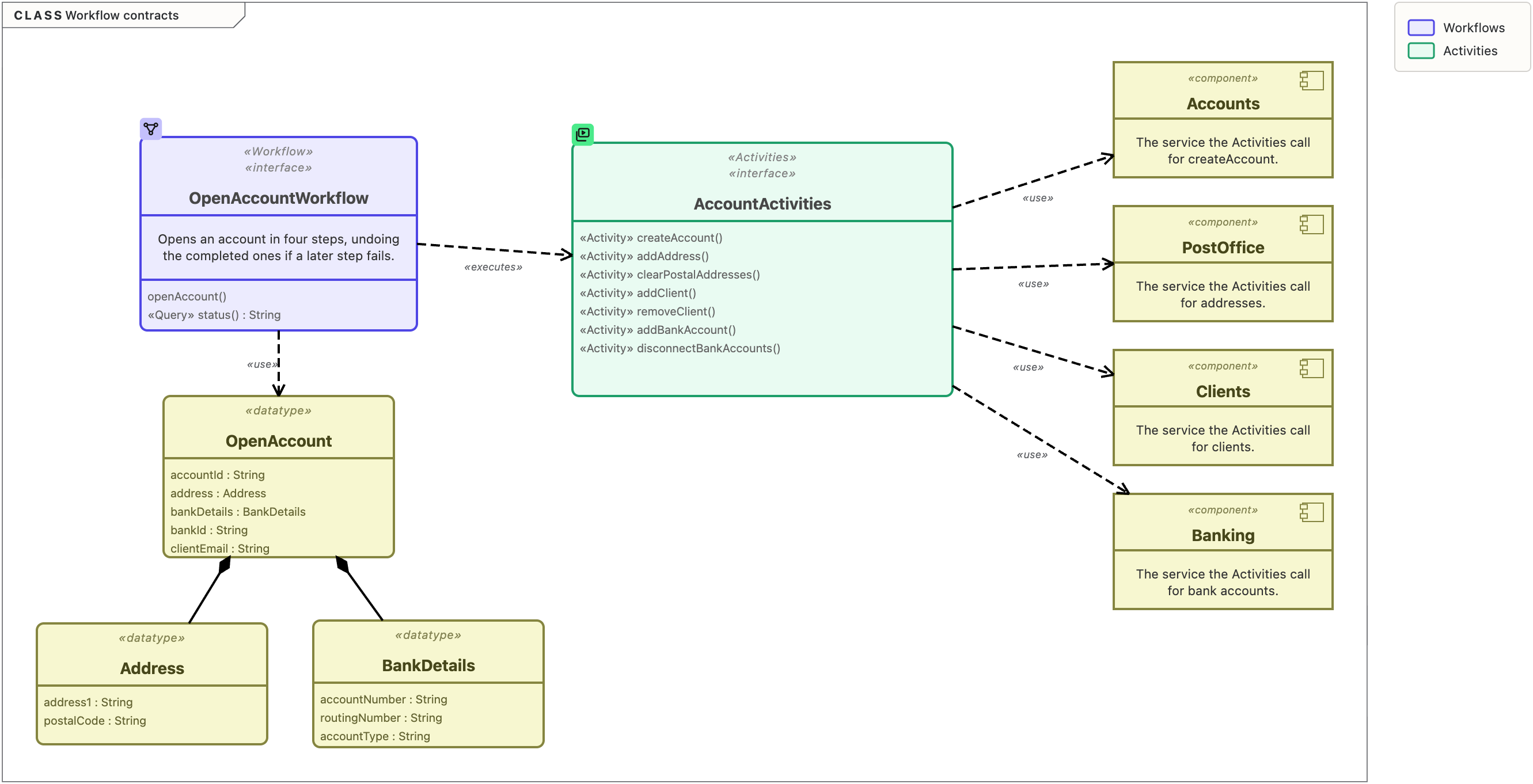
A Temporal application is more than its happy path. The Workflow contracts diagram shows the interfaces the code is built on:
- the Workflow, with its Task Queue
saga-demoand its Workflow id patternsaga-{accountId}; - the seven Activities, each with its timeouts;
- the Workflow's input;
- the services the Activities call.
The guide also explains, in prose, who does what at run time. A client starts the Workflow on the Temporal Service, a Worker polls the Task Queue, and the Worker runs both the Workflow and its Activities. That's a deployment diagram:
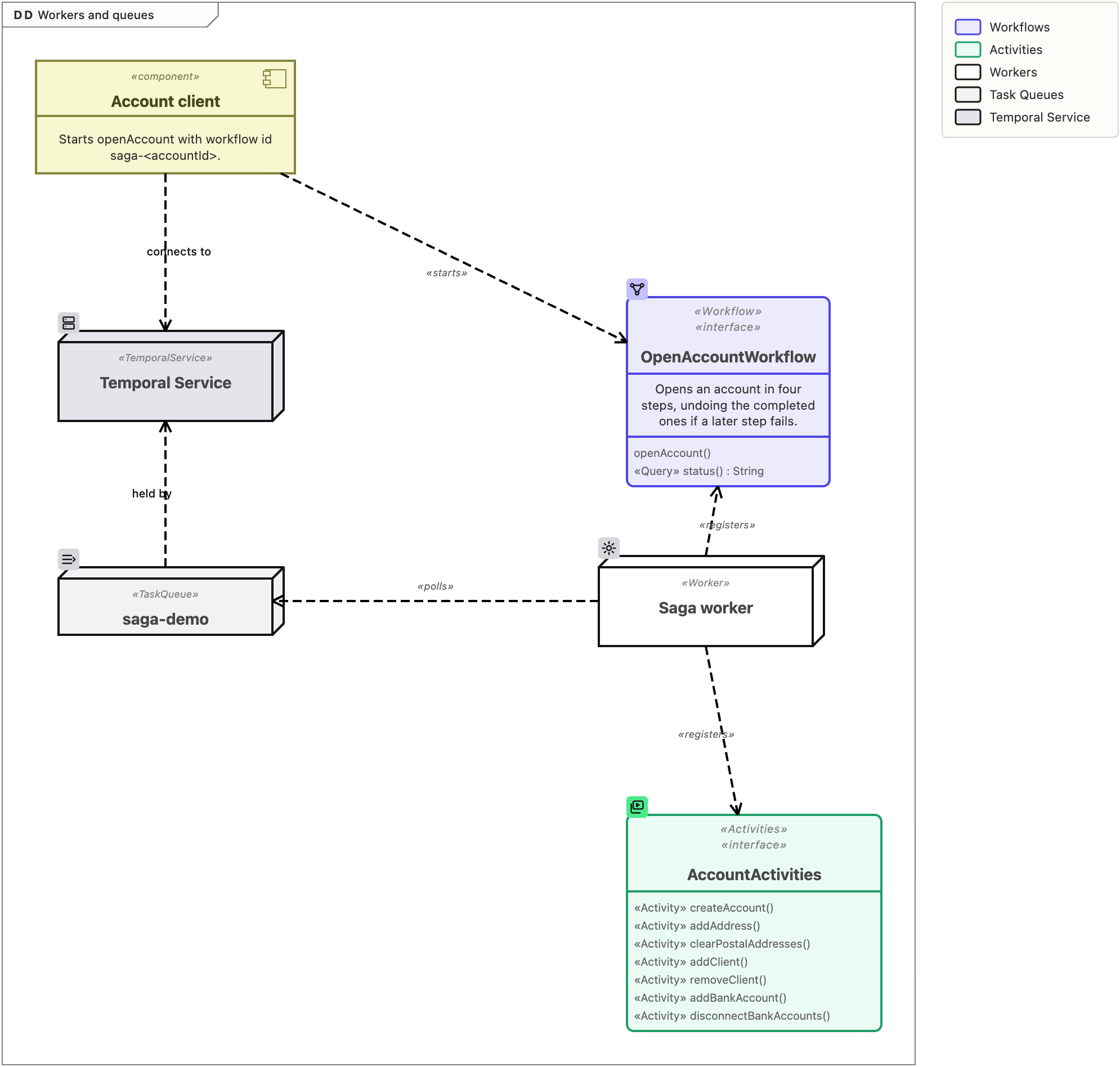
The model ties all of this together. EOModeller's validation reports any Task Queue no Worker polls, and any Workflow or Activities no Worker registers. Both are easy mistakes when the queue name is a string repeated across three files.
One run, step by step
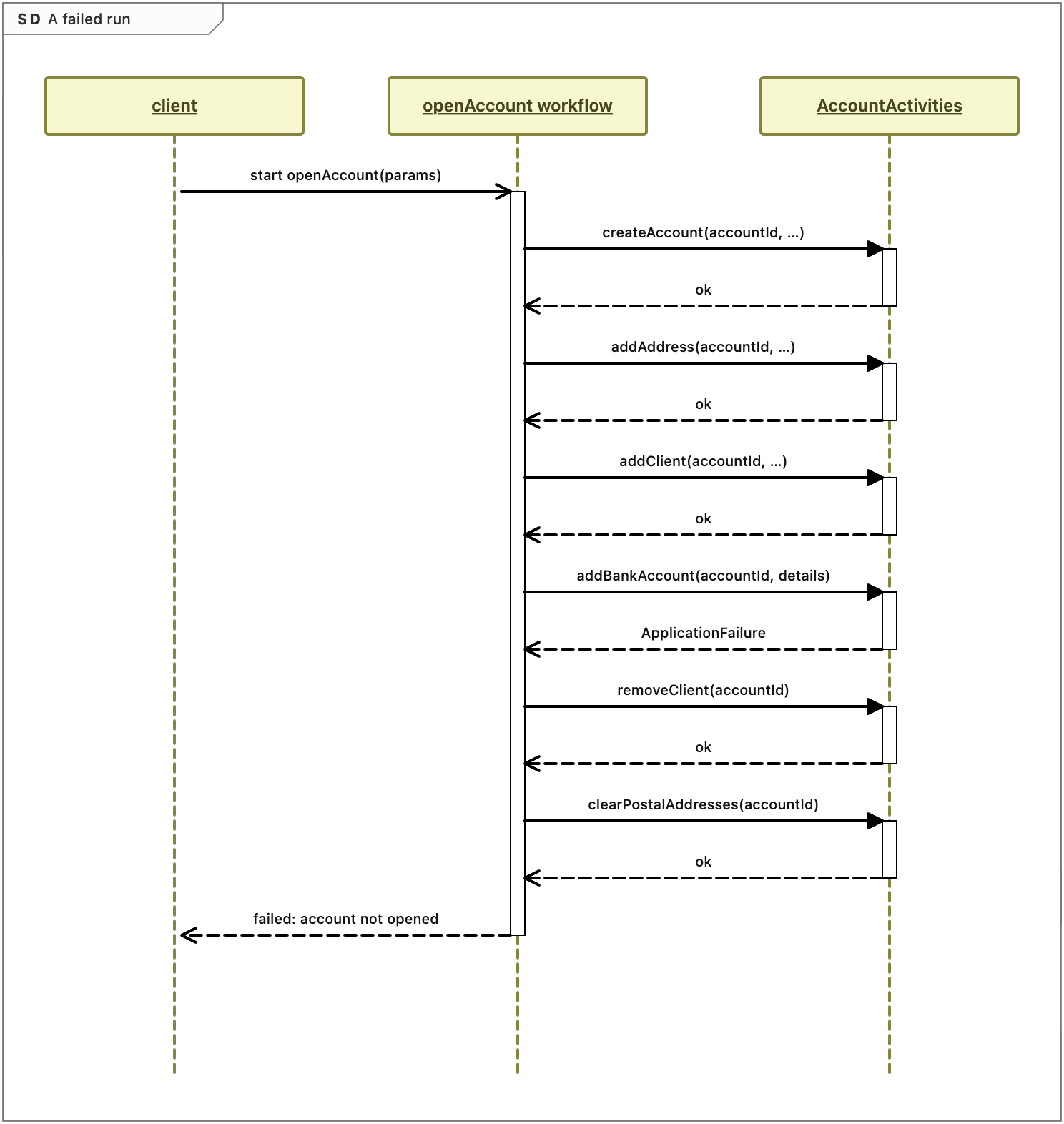
A sequence diagram shows the account saga failing in time order. The client starts the Workflow, three steps succeed, and adding the bank account fails. Then the compensations run, newest first: remove the client, then clear the addresses. Finally the client hears that the account wasn't opened.
Offering it to another team
Temporal Nexus lets one team offer durable operations to another across Namespaces, without either knowing how the other is deployed. The guide doesn't cover it, but the account saga is a natural example: the accounts team offers open an account to the onboarding team.
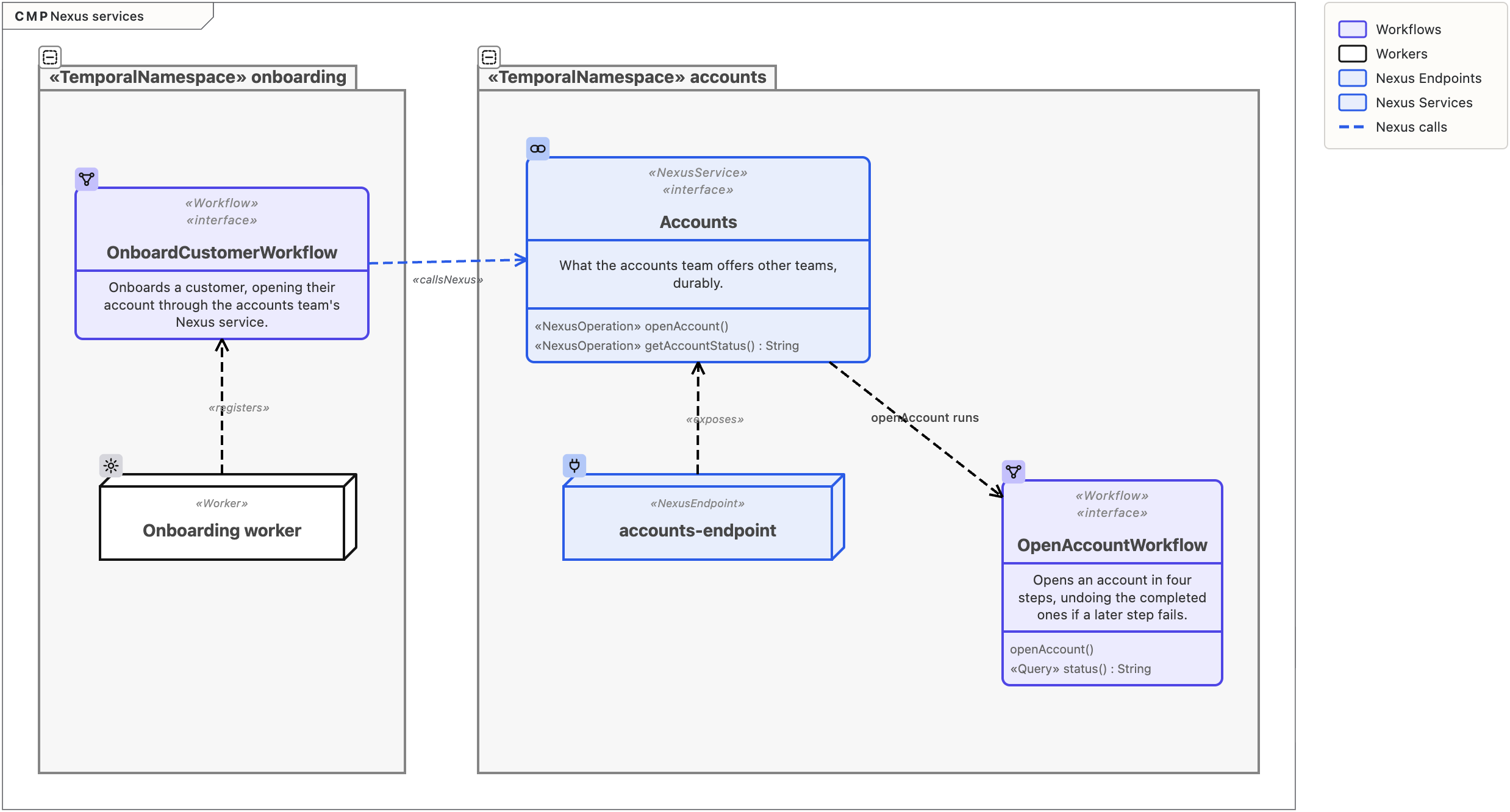
openAccount is asynchronous: it starts the saga Workflow and can take as long as it needs. getAccountStatus is synchronous: it answers from a Query on the running Workflow. Validation knows the difference. It warns if a synchronous operation starts a Workflow, because synchronous handlers have only ten seconds.
How it was built
The whole model was built from one change set of a hundred and fifty changes, the same format an AI assistant sends through EOModeller's MCP server. The server checks the whole set before saving anything, so it went in all at once or not at all. The Temporal profile gives it the vocabulary («Workflow», «Activity», «Compensation», «Worker», «NexusService» and so on). New Diagram has a Temporal group whose presets set the viewpoint and apply the Temporal stylesheet.
Building it improved EOModeller, too. A compensation is itself an Activity call with its own timeouts, so «Compensation» now inherits from «Activity». And stereotypes on dependency lines («polls», «registers») are now drawn on the canvas, which they weren't before.
References
- The Saga Pattern Made Easy: Automating the Saga Pattern with Temporal, Temporal technical guide, January 2024
- Saga pattern, Temporal documentation
sagasample, temporalio/samples-typescript- Saga Pattern in Microservices, Baeldung, the source of the guide's figure
- Temporal Nexus, Temporal documentation
- Connecting an AI assistant to EOModeller